
Before continuing, make sure you have a web server (like Apache) configured with the following requirements.
You can get the latest stable release on the Kohana website. This will give you a fully
functional application with an application, modules, public, and system directory.
You can find information about the file structure on the Cascading Filesystem page.
Once downloaded, you should extract the Kohana application to a directory where the web server can access it. Going
forward, we are going to assume you've extracted the application to a kohana directory. Then change to the kohana
directory and install dependencies with Composer:
composer install
Before the application can be run, you will need to make a few changes to the application/bootstrap.php file. This
file is the first one to be included by public/index.php and sets up most of the global options for the application.
Open application/bootstrap.php and make the following changes:
// Example of changing timezone to Sao Paulo, Brazil
date_default_timezone_set('America/Sao_Paulo');
base_url in the Kohana::init call to reflect the location of the kohana folder on your server relative to the document root./**
* Example of kohana's installation at /var/www/kohana and
* Apache's DocumentRoot configured to /var/www
*/
Kohana::init([
'base_url' => '/kohana/',
]);
List your trusted hosts. Open application/config/url.php and add regex patterns of the hosts you expect your application to be accessible from.
Do not forget to escape your dots (.) as these are regex patterns. These patterns should always fully match, as they are prepended with ^ and appended with $.
return [
    'trusted_hosts' => [
        'example\.org',
        '.*\.example\.org',
    ],
];
Cookie class.Cookie::$salt = 'some-really-long-cookie-salt-here';
application/cache and application/logs directories are writable by the web server.sudo chmod -R a+rwx application/cache
sudo chmod -R a+rwx application/logs
Make sure to use a unique salt for your application and never to share it. Take a look at the Cookies page for more information on how cookies work in Kohana. If you do not define a Cookie::$salt value, Kohana will throw an exception when it encounters any cookie on your domain.
You should see the installation page. If it reports any errors, you will need to correct them before continuing.
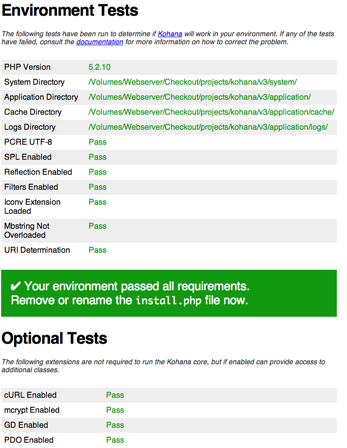
Once your installation page reports that your environment is set up correctly you need to either rename or delete install.php. Kohana is now installed, and you should see the output of the welcome controller:
